Pre-release · version 0.1.0
Understand the code. Plan the change. Verify the result.
Steward is a local-first desktop app for software engineering. Discuss, plan, code and review with your own AI engines, while your projects, memory and keys stay on your machine.
Tasks
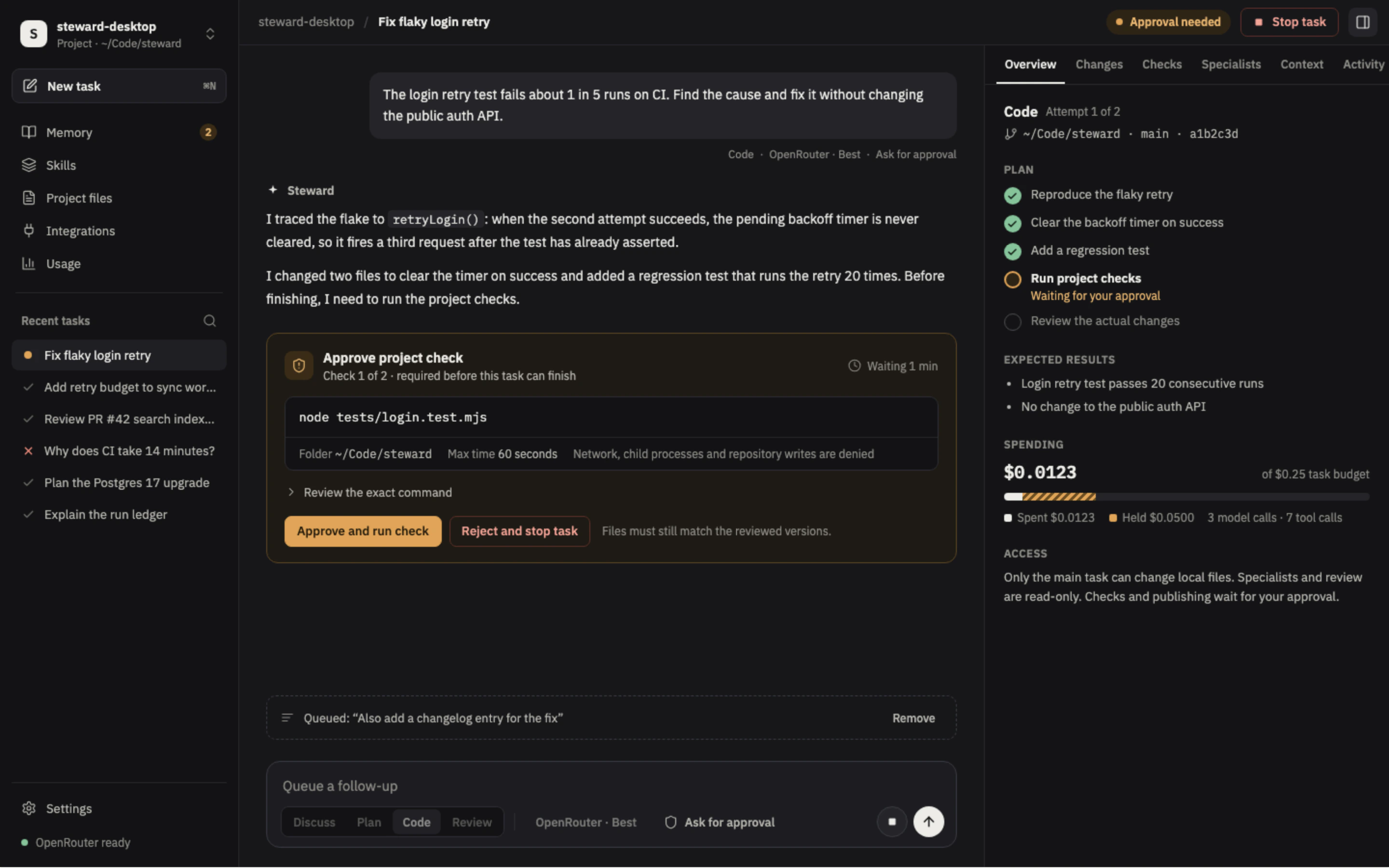
Four actions. Only Code edits files.
Choose what Steward should do, separately from which model does it. Discuss, Plan and Review keep your source read-only.
- Type @ to point Discuss, Plan or Review at files in your checkout or at earlier tasks in the project.
- Paste or drop up to four screenshots into Discuss, Plan or Review, for OpenRouter vision models and Anthropic or OpenAI keys.
- Search finds tasks by what was said in them, in this project or across all projects.
- Export any task as one Markdown file with its messages, diff, check receipts and cost. Credentials are redacted.
-
Discuss
Work through code, requirements and architecture with your project's context.
-
Plan
Turn a request into steps and acceptance criteria before anything changes.
-
Code
Edit a folder you attach and run only the checks you approve. Finishing needs fresh passing checks and a review of the actual changes.
-
Review
Check local code or a GitHub pull request against your own architecture and conventions.
Control
You decide how much Steward may do.
Approvals are a setting you can see, right in the composer. Full access is a separate, native-confirmed choice, and it resets when you quit.
-
Ask for approval
Approve project checks and external publishing.
-
Approve for me
Run scoped project edits and checks automatically. Broader actions still wait for you.
-
Full access
Files and shell commands across this computer, with your user permissions. Applies to Code tasks and resets when you quit Steward. In a Git checkout, each run can be restored.
In every mode, suggested memories still need your review.
Verify
Review the real diff. Restore it if you disagree.
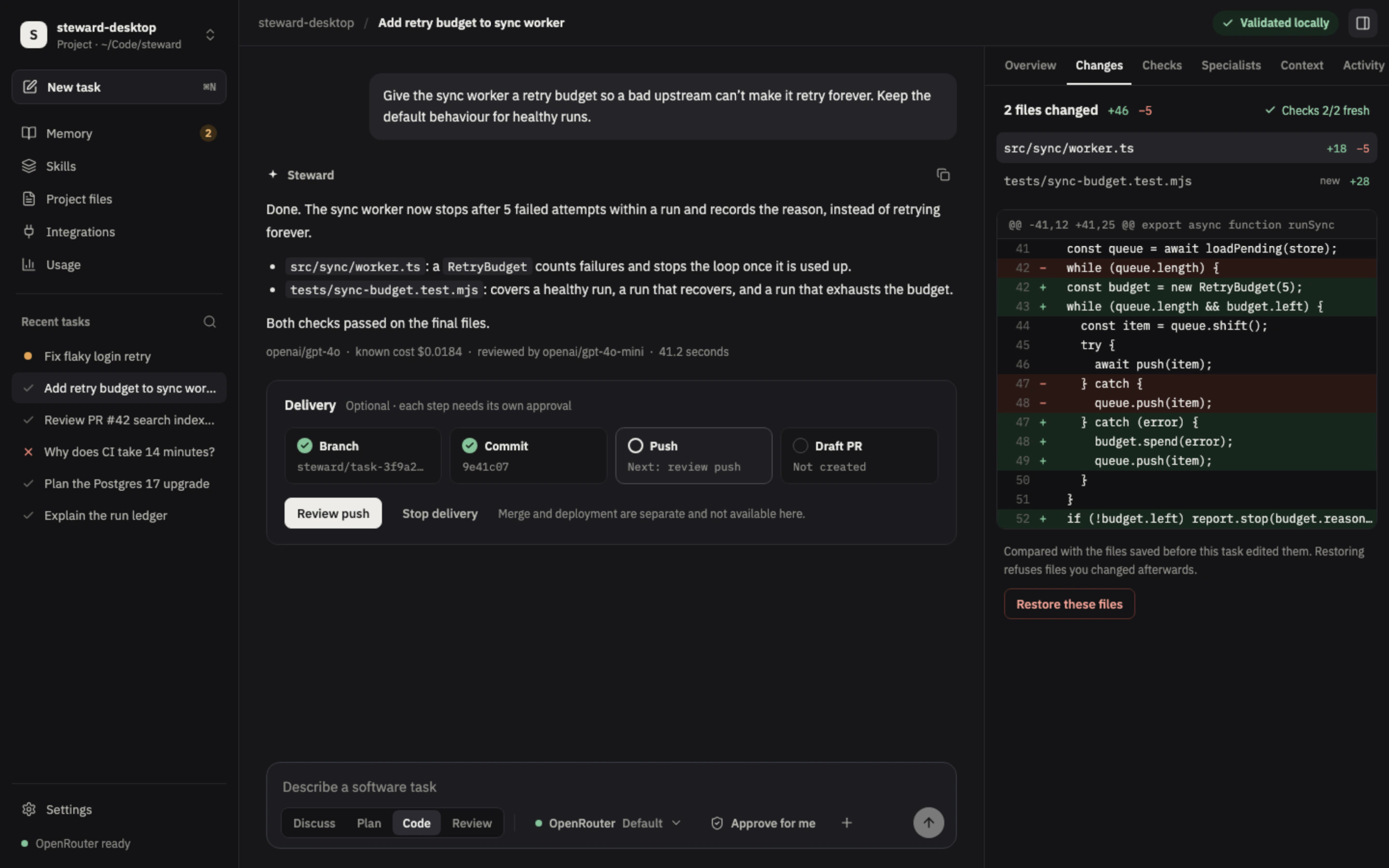
A Code task is not done until its checks pass on the final files and the actual changes have been reviewed. Delivery is optional: branch, commit, push and draft pull request each need their own approval, and merge and deployment stay separate.
- Checks run only after you approve the exact command, with network, child processes and repository writes denied.
- An independent model reviews the changes before the task completes.
- Restoring compares with the files saved before the task edited them and skips files you changed afterwards. In a Git checkout, Full access runs keep restore points that cover shell-command changes too.
- Project files shows the attached folder as a browsable tree, with Open for each file and Reveal in Finder for the folder. Files a Full access task wrote are one click away on its Changes tab.
Memory
Memory you can read, edit and veto.
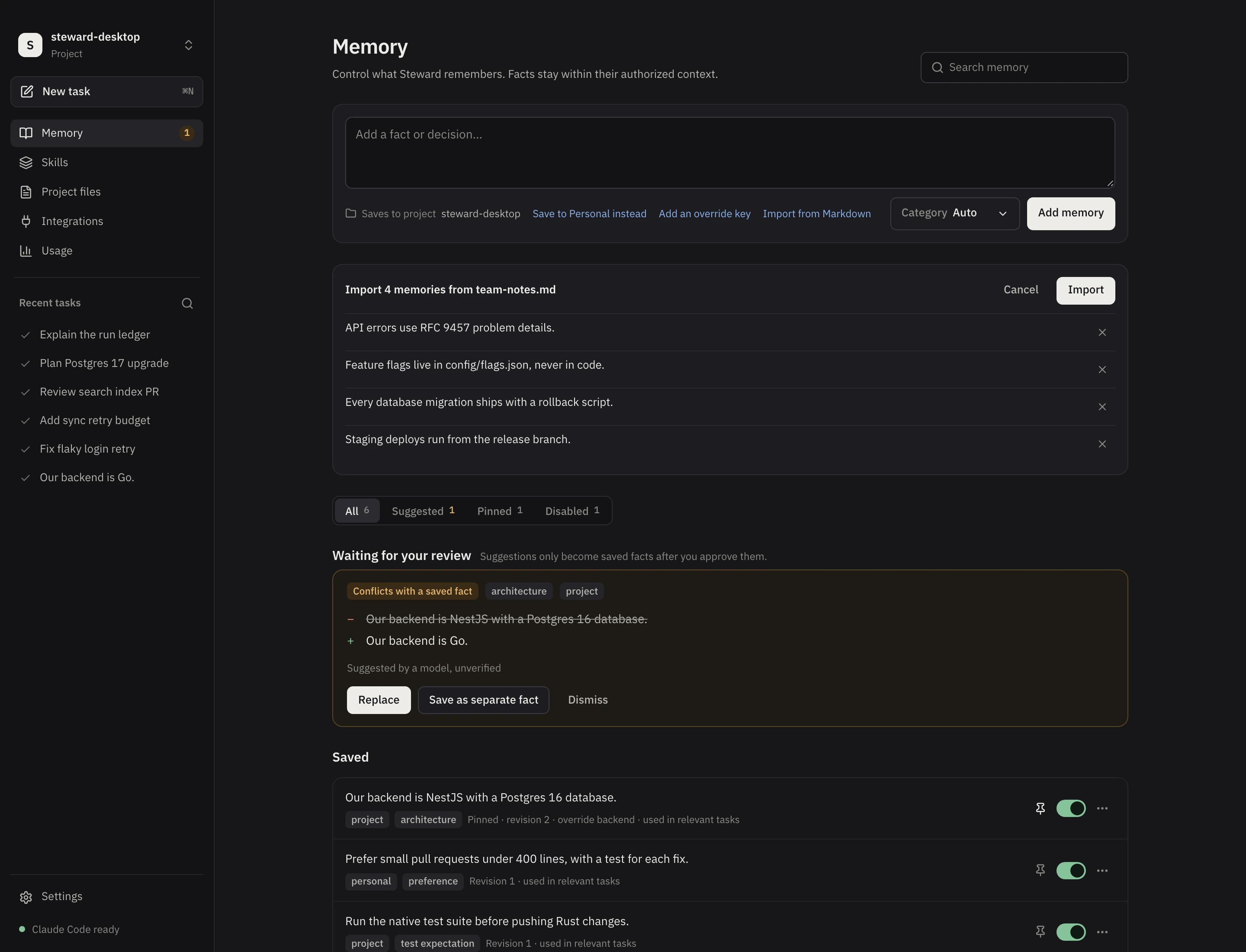
Facts you save are recalled in later tasks. Anything suggested by a model or a repository file waits for your review before it becomes a saved fact.
- Conflicts show exactly what would be replaced. Replace it, save both, or dismiss.
- Pin, switch off, edit or delete any fact.
- Write facts over several lines, or import a Markdown file and choose which items to keep.
- Saving and recalling memory works offline.
Skills
Built-in procedures, plus your own.
Skills tell Steward how to do a kind of work. The built-in ones load when they match your task. Yours load when you name them.
-
Built in
Nine procedures for navigation, implementation, debugging, validation, review, architecture, research, documentation and engineering knowledge.
-
Write your own
Describe the work in plain words or import a Markdown file. Refine with AI turns rough notes into a clear draft that you review before saving.
-
Loaded only by name
Name a skill in your task, like
/release-notes. Skills describe how to work and never grant tools or permissions.
Your skills stay on your machine. Each task keeps the exact copy it used, with a content hash you can check.
Engines
Bring your own engine. Keep your own limits.
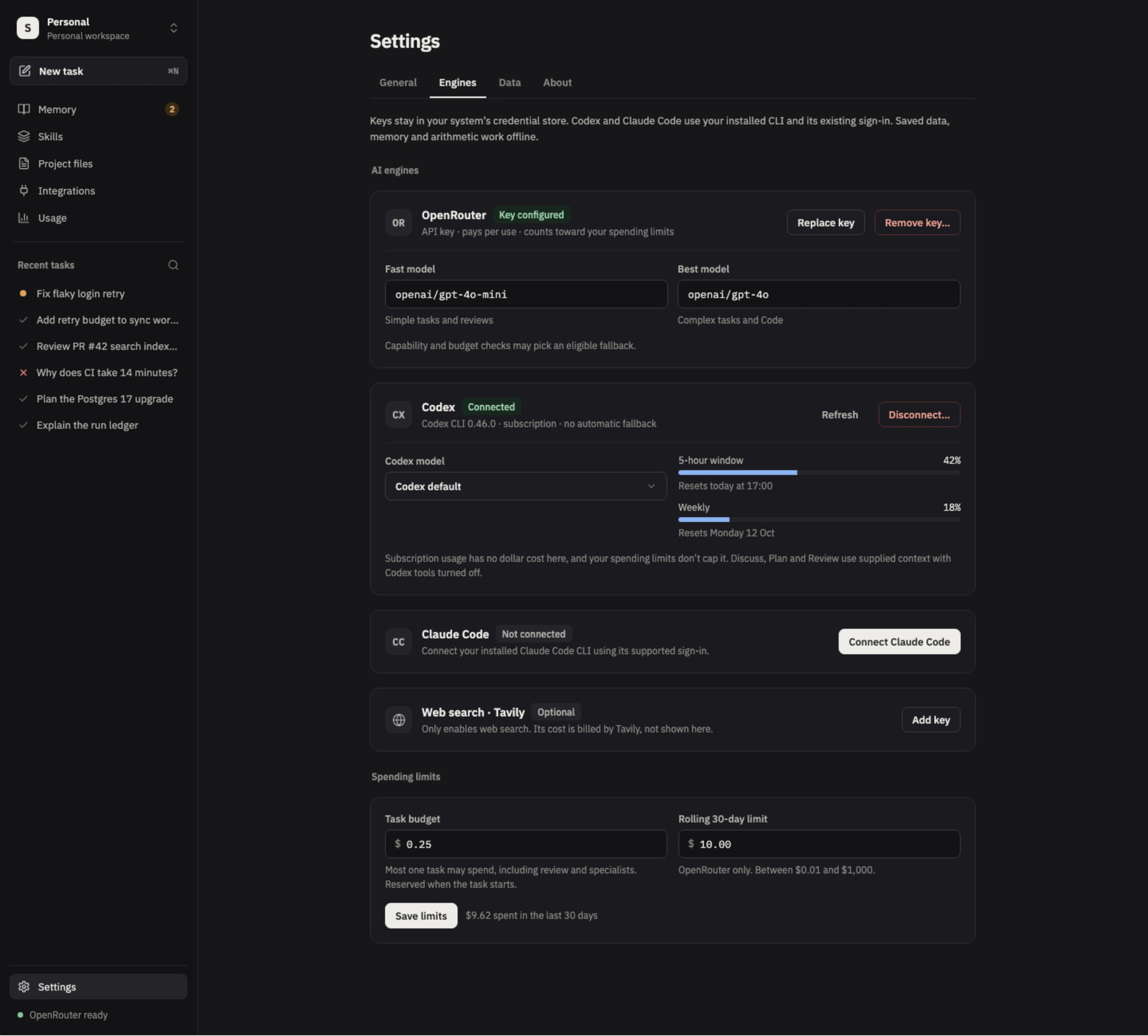
Connect an OpenRouter, Anthropic or OpenAI API key, or use your installed Codex or Claude Code CLI with its existing sign-in. Keys stay in your system's credential store.
- Pick fast and best OpenRouter models from a searchable catalog that flags models routing would reject, then set a budget per task and a rolling 30-day limit.
- Each task reserves its budget up front, and new OpenRouter tasks pause when the window is nearly full.
- Subscription and Anthropic or OpenAI key usage, and optional Tavily web search, are reported separately, never counted as dollars.
- A model that repeats the same action with the same result is told so, then stopped, instead of spending its turns.
- Works behind corporate proxies and HTTPS inspection: requests trust your system's certificates and follow its proxy settings.
Trust
Your data stays on your machine.
Working data lives in a local database. Personal use needs no Steward account, hosted API, PostgreSQL, Redis or Docker.
Local storage
Projects, conversations, memory, reference files, history, approvals and usage live in SQLite in your operating system's application-data folder.
Keys in the credential store
macOS Keychain, Windows Credential Manager or the Linux Secret Service. Backups never include them.
Approvals that expire
Publishing needs approval of the exact text. Approvals expire and work once.
Read-only where it matters
Only the main Code task can change local files. Specialists and review are read-only, and checks and publishing wait for you.
Memory under your control
Suggestions wait in Memory for your approval or dismissal. Every fact can be pinned, switched off, edited or deleted.
Explicit GitHub access
Steward reads only the repositories you allow. Comments on a pull request need your approval.
Status
Pre-release, and clear about what is missing.
Built with Tauri 2, React, TypeScript and a Rust runtime, for macOS, Windows and Linux. Signed installers and update testing are part of the V1 release gate.
-
Working now
- Local planning and routing across OpenRouter, Codex, Claude Code and Anthropic or OpenAI API keys
- Persistent memory, backups and usage tracking
- Nine built-in skills, plus skills you write and name in a task
- GitHub pull request review with approvals, and optional web search
-
Not yet
- Live provider and tool acceptance testing
- Signed installers, notarization and tested updates
- Code tasks on Windows, until project-check containment is verified there. Discuss, Plan and Review work.
- Cloud sync, accounts, shared workspaces, hosted billing and server telemetry. These are later capabilities.